Unity Entities中的数据存储和遍历
本文最后更新于 2026年8月26日 下午
Entities中的数据存储和遍历
这是在Unity Entities中遍历的一个经典例子
现在来分析这段代码究竟做了什么,是如何到Position和Velocity的
1 | |
Entity
Entity本身只有两个int,可以简单理解成
1 | |
Index是Entity的编号,Version用来判断这个Entity是否已经失效。
Entity销毁以后Index可以复用,例如原来的Entity是(100, 1),后来新建的Entity又拿到了Index 100,Version会变成2。之前保存的(100, 1)就不能访问这个新Entity。
World内部会记录Entity现在存在哪里
1 | |
所以Entity不是组件的指针,只是一个句柄。
Entity从一个Chunk搬到另一个Chunk,Entity本身可以不变,只需要更新这份映射。
两个World中的Entity即使Index和Version都一样,也不是同一个Entity。
Archetype
Archetype表示一组组件类型的组合。
1 | |
这里有三个Archetype
1 | |
组件的值不影响Archetype。A和B的位置、速度完全不同,仍然属于同一个Archetype。
Query查询Position + Velocity时,会先匹配Archetype 1和Archetype 2,然后遍历它们下面的Chunk。并不会把World里所有Entity拿出来检查一次。
Tag Component虽然不占逐Entity的数据空间,但Tag也属于组件类型,当然会影响Archetype。
如果有10个可以独立添加删除的Tag,最多能组合出2^10 = 1024种Archetype。实际项目不一定真的全排列,但是拿Tag表示一堆频繁切换的状态,Archetype数量会很多
Chunk
同一个Archetype的Entity会放进一个或多个Chunk。
标准Chunk是一块16 KiB的内存,里面按组件类型分成多段数组
1 | |
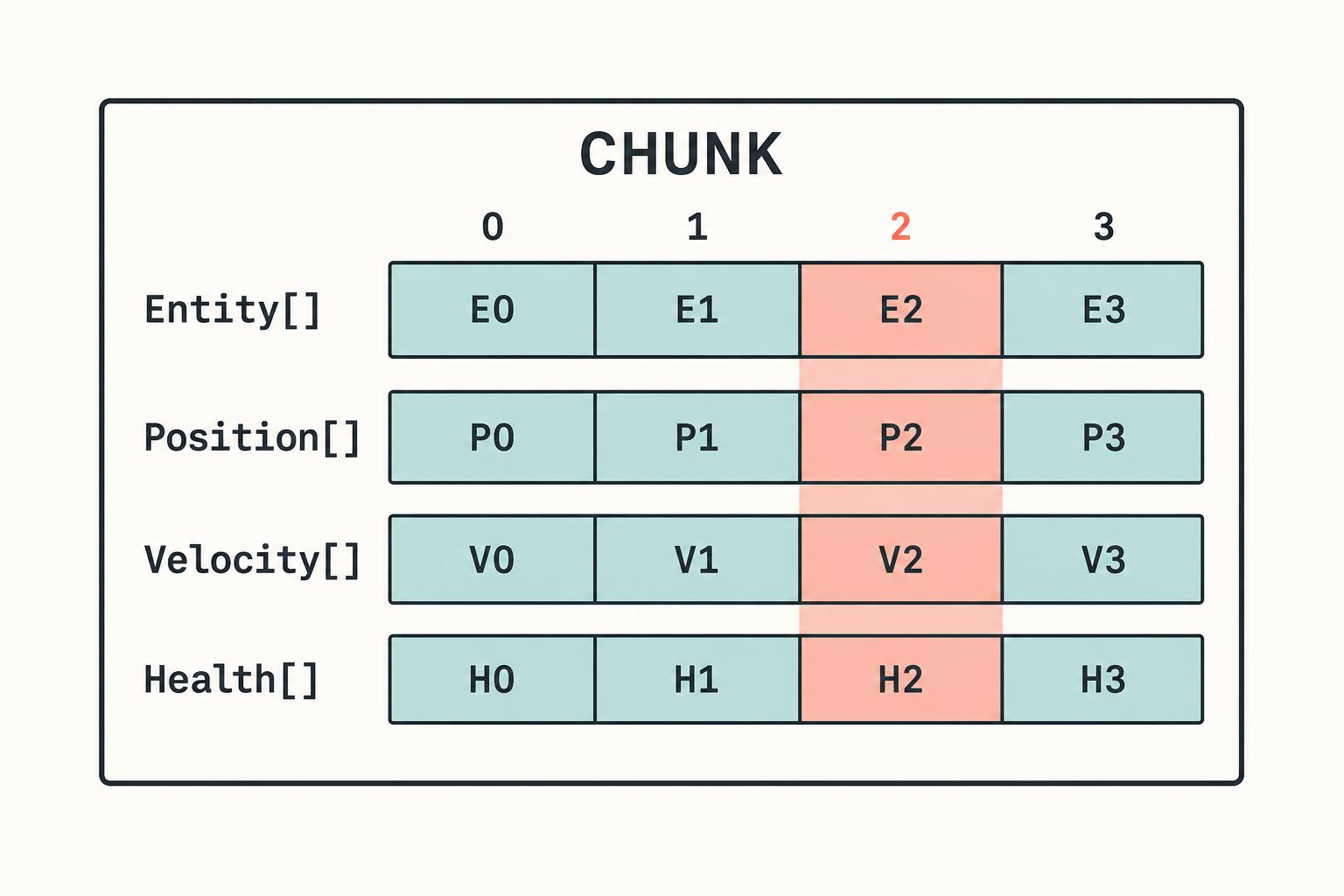
相同下标属于同一个Entity。E2的组件就是P2、V2和H2。
这就是SoA(Structure of Arrays),不过范围只在一个Chunk内,不是整个World共用一个Position数组。
面向对象的写法通常是这样
1 | |
移动系统只用Position和Velocity,但是每个Unit中还夹着Health、Name和View,对象本身也可能散落在托管堆里。
Chunk中的Position和Velocity是连续数组。移动系统的循环其实更像
1 | |
CPU缓存和硬件预取喜欢这种内存,Burst也更容易向量化。
这就是ECS快的核心,充分利用了CPU缓存和SIMD指令。
Chunk Capacity
一个Chunk能装多少Entity,取决于这个Archetype中每个Entity占多少空间。
除了普通组件,还要算Entity数组、内存对齐、Dynamic Buffer内部容量和Chunk自己的元数据,不能直接用16 KiB除以组件大小。
组件越大,Chunk Capacity越低。
如果一个每帧运行的系统只读取Position,却把名字、角色描述、低频统计也塞在同一个组件中,一次Chunk能处理的Entity会变少。这些冷数据还会跟着Position一起进入缓存,很亏。
Chunk中的顺序
Chunk中间不能留洞。
删除B时,通常会把最后一个Entity搬过来,这是一个常见数组的O(1)删除算法
当然因此Query返回的顺序不稳定,不能拿它当业务顺序。
如果确实需要顺序,保存一个排序字段,然后自己排序。
Entity发生结构变化以后也可能被搬走,之前拿到的组件引用、指针、DynamicBuffer都不能长期保存。
1 | |
Query是怎么遍历的
回到开头的移动代码
1 | |
SystemAPI.Query会通过Source Generator生成代码并缓存EntityQuery。
大概的执行过程
1 | |
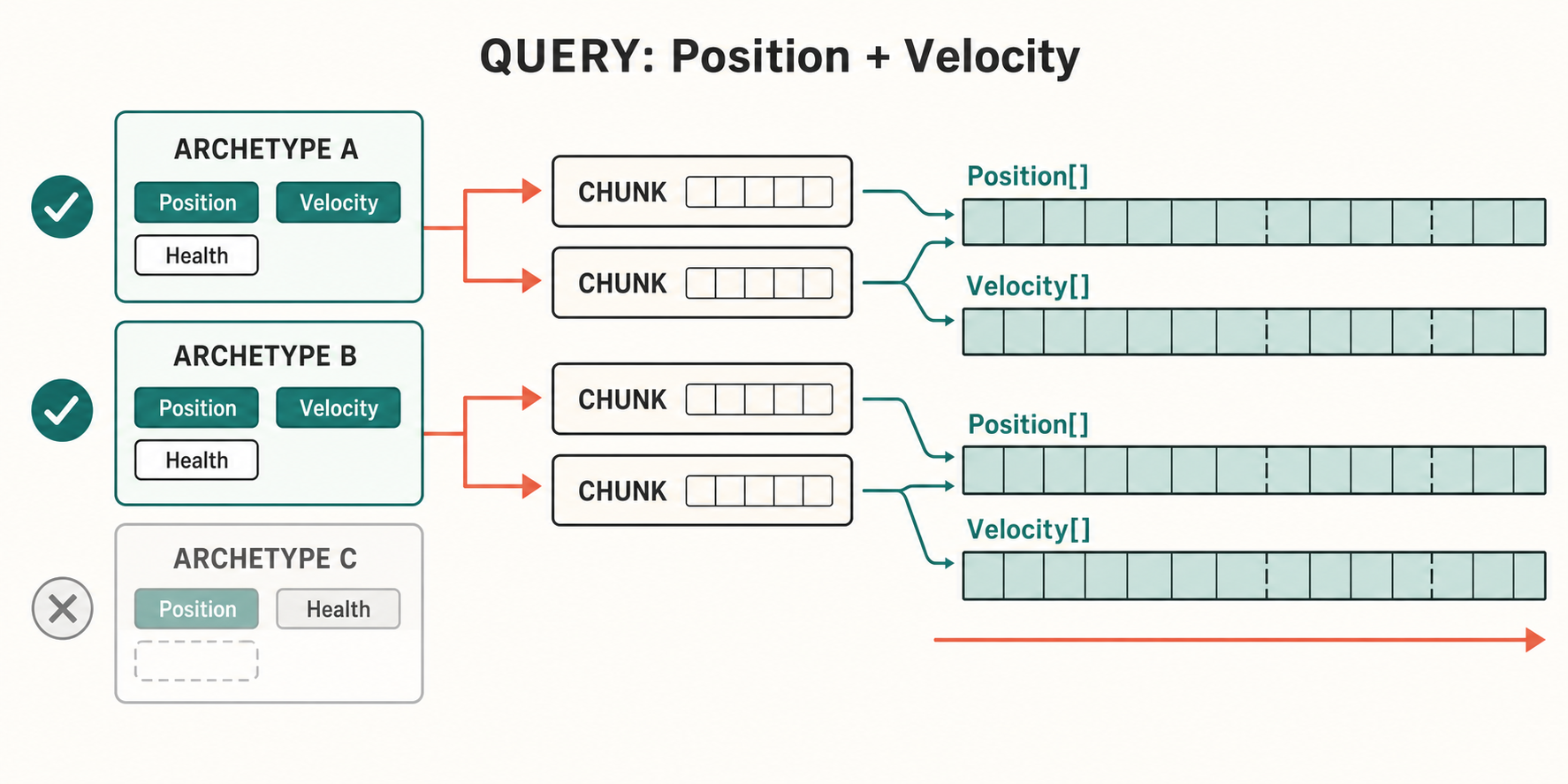
不是这样
1 | |
RefRW<Position>表示要写Position,RefRO<Velocity>表示只读Velocity。这个声明会参与Job依赖分析,不只是API写法不同。
Query的过滤
普通的组件查询在Archetype层就能完成。
Shared Component Filter和Change Filter是Chunk级别的过滤。一个Chunk通过以后,通常会处理整个Chunk。
Enableable Component不同,它有每个Entity自己的启用位。同一个Chunk中可能只有一部分Entity启用了某个组件,所以遍历时还要看Enabled Mask。
这也是IJobChunk.Execute中为什么会出现useEnabledMask和chunkEnabledMask。
IJobEntity
IJobEntity按Entity写Execute
1 | |
ref Position是写入,in Velocity是只读。Source Generator可以直接从Execute参数生成Query。
调度代码
1 | |
这里不是给每个Entity创建一个Job。
IJobEntity最终还是转换成Chunk遍历,再把不同Chunk分给工作线程。一个Entity一个Job的话,调度成本早就爆炸了。
多数逐Entity计算用IJobEntity就可以,代码比较少,读写权限和Enabled Mask也会自动处理。
IJobChunk
需要直接访问Chunk时可以用IJobChunk,例如每个Chunk只计算一次、处理Chunk Component,或者自己控制遍历过程。
1 | |
到这里就能直接看到Chunk里的组件数组了。
如果Query不涉及Enableable Component,循环基本就是一个普通for。通用写法不能直接忽略Enabled Mask,不然禁用组件的Entity也会被处理。
IJobChunk没有什么神奇的,只是Source Generator原本帮忙处理的东西,现在需要自己写了。
结构变化
修改组件的值不会改变Entity的存储结构
1 | |
添加、删除组件则会改变Archetype。
1 | |
Entity要从旧Chunk搬到新Archetype的Chunk中
1 | |
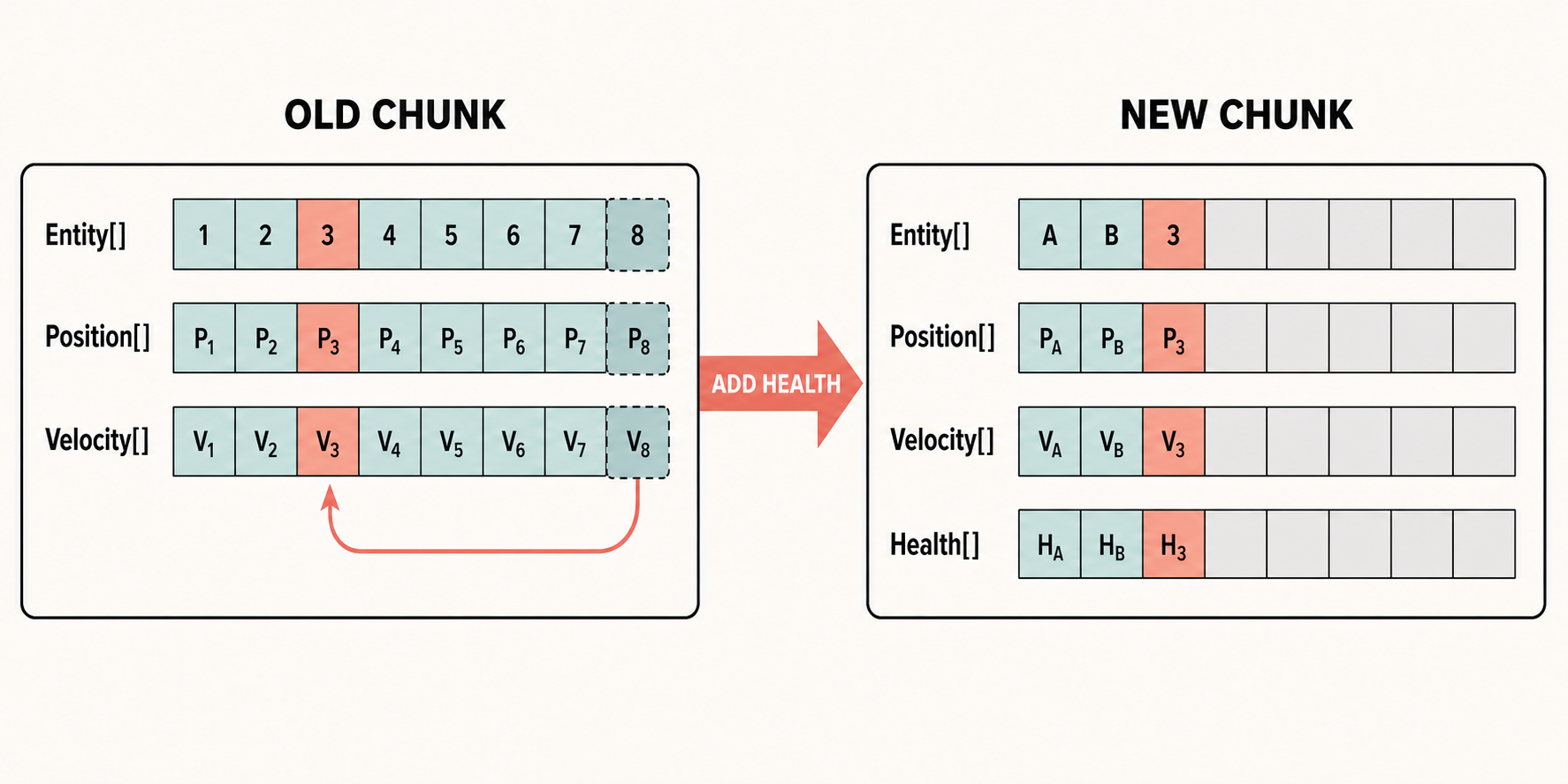
旧Chunk删掉Entity以后,还要拿末尾Entity填空。
Entity句柄没有变,但是组件数据的地址和IndexInChunk都可能变了。
创建、销毁Entity,添加、删除组件,修改Shared Component,都属于结构变化。除了搬数据,还可能需要先完成正在访问相关组件的Job,于是主线程出现同步点。
EntityCommandBuffer可以在Job中先记录操作,等到固定的位置统一Playback。这样不会在帧内到处产生同步点,也方便批量处理。
但是ECB只是晚点搬,不是不搬。Playback时结构变化的成本依然存在。
创建大量同类Entity时,最好直接使用最终Archetype批量创建。先创建空Entity,再一个个Add Component,会在几个中间Archetype之间反复横跳。
Enableable Component
如果一个状态需要频繁开关,可以使用Enableable Component
1 | |
禁用时组件数据没有删除,Entity也不用换Archetype,只修改Chunk中的Enabled Mask。
代价是Query遍历时需要根据Mask跳过一部分Entity。
它就是用稍微复杂一点的遍历,换掉频繁搬Entity的成本。很久才改变一次的状态没必要全部改成Enableable Component。
几种特殊组件的存储
Dynamic Buffer
Dynamic Buffer可以在Chunk中预留一部分空间
1 | |
不超过8个元素时,数据留在Chunk中。超过以后转移到外部内存。
Internal Buffer Capacity不是越大越好。每个Entity预留32个元素,实际大部分Entity只用2个,剩下30个的位置会一直占着Chunk。
设得太小又会让大量Buffer溢出,产生外部分配和一次间接访问。
还是要看项目里Buffer长度的实际分布,没有一个通用数字。
Shared Component
Shared Component用于按值给Chunk分组。一个Chunk中的Entity必须使用相同的Shared Component值。
例如按渲染批次或者阵营分组,值的数量很少,这样是合适的。
如果1000个Entity有1000个Shared Component值,可能会拆出大量只装了一个Entity的Chunk。这个Shared就没Shared起来,只剩碎片了。
Shared Component不适合保存唯一ID,也不适合保存每帧变化的数据。
Managed Component
Managed Component的对象在托管内存中,Chunk中保存它的关联。
这意味着GC、间接访问和Burst限制。
Tag Component和Chunk Component
Tag Component没有逐Entity数据,只参与Archetype和Query匹配。
Chunk Component是每个Chunk保存一份,适合Chunk级别的LOD、边界和统计数据。
Query和随机访问
Query适合批量遍历,但不是所有逻辑都能写成Query。
例如一个Entity保存了攻击目标
1 | |
已经知道目标Entity,需要读取它的Position,可以使用ComponentLookup
1 | |
Lookup需要通过Entity定位Chunk和IndexInChunk,目标Entity之间也不一定连续。
父子关系、Owner、攻击目标这种跨Entity读取适合Lookup。批量更新自身组件还是应该用Query。